

General composition of the HestiaCP control panel
On the main screen of the control panel you will see all services grouped into sections.
These are the main options:
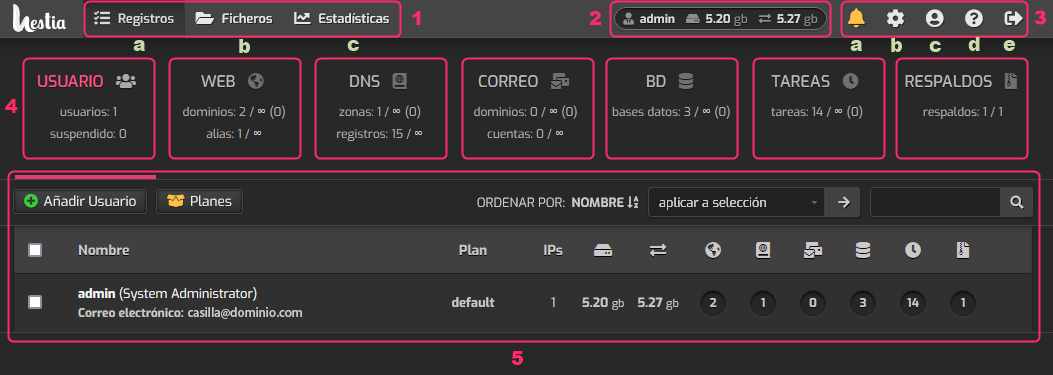
- These three options allow you to access common services of a hosting account:
a. Records: This option is the same as the USER box. It will show the hosting accounts created with their specific information.
b. Files: This option will open the file manager of the selected hosting account.
c. Statistics: You will be able to see the usage statistics of a hosting account. - This section shows the user, the disk space and bandwidth consumed by the selected hosting account.
- In this section we will see several options:
a. Notifications: This option will display notifications and alerts generated by the control panel.
b. Configuration: From this option you will access the server’s global configuration.
c. User: This option will allow you to change various aspects of the control panel, such as the access password, theme, language, etc.
d. Help: You can access the control panel documentation from this option.
e. Log out: From this option you can log out of the control panel. - In this section you will see all the main services, such as the website, mailboxes, databases, etc.
- In this area you will see the data and information related to the option you selected in point 4.
For example, the image shows the information from the USER section.
This is a general screenshot of the control panel. In other sections of our guide you will see the specific use of each area of the control panel.