How to access mailboxes via Webmail with HestiaCP?
Below we will show you how to check your mailboxes from HestiaCP’s Webmail.
Below, we will detail the accesses to Webmail and how to obtain the data to configure the mailboxes in external email clients such as Outlook, Thunderbird, Mac Mail, etc.
- Access from the browser
- Access from the Control Panel
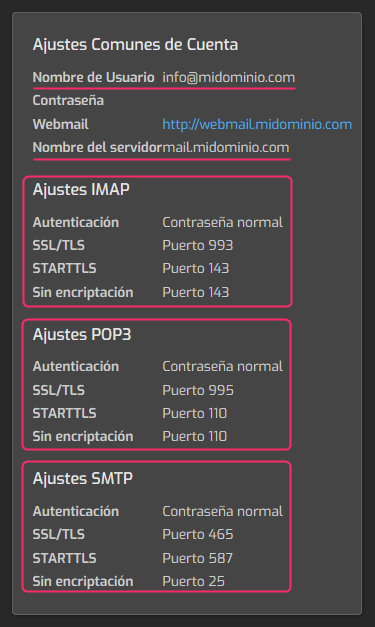
- Data to configure mailboxes in external email clients
Access from the browser
In your browser type the web address:
webmail.tudominio.com
replacing tudominio.com with the domain of your mailboxes.
Access from the Control Panel
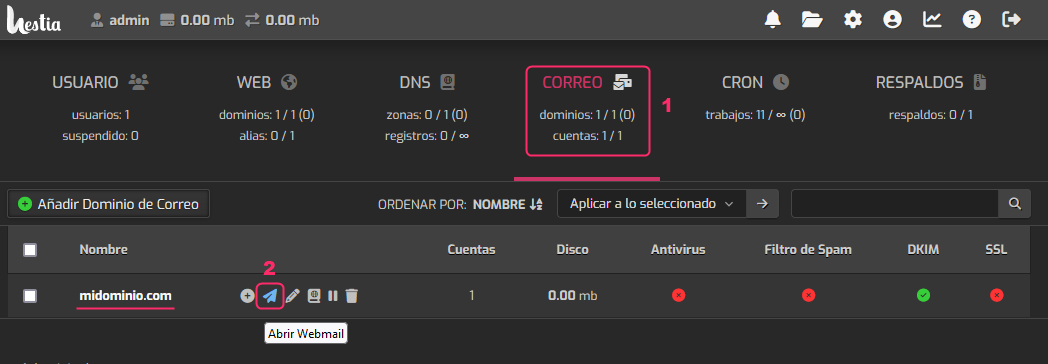
- Log in to the HestiaCP Control Panel
- In the control panel go to the MAIL area.
- In the domain list click the blue paper airplane icon.
Data to configure mailboxes in external email clients
When creating a mailbox, or when modifying its parameters, you will see on the right a box with the details to configure in the email client you use.